
 FREE DOWNLOAD
Know Your Network
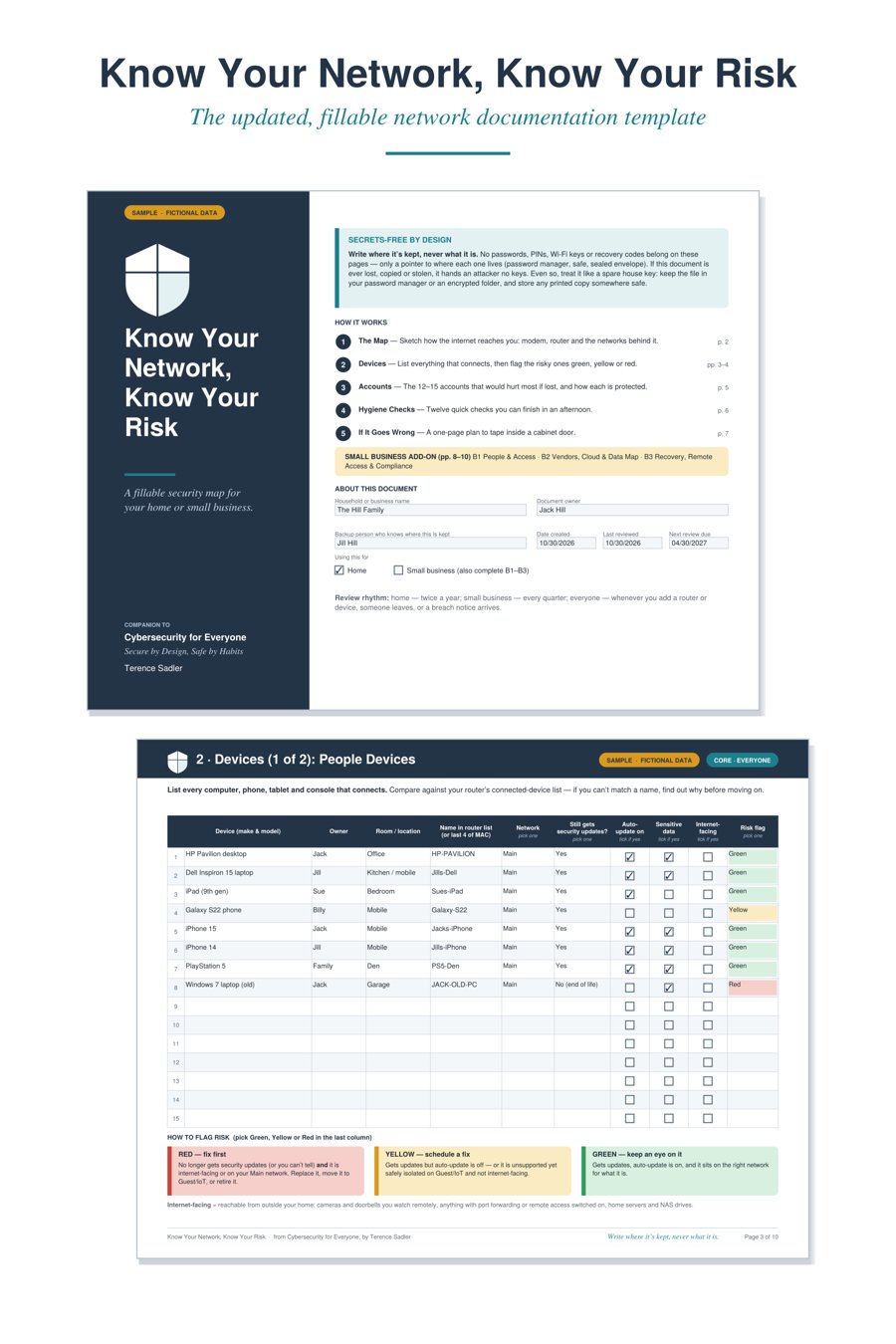
You can't protect what you don't know you have. This fillable template helps you map your internet connection, list every device and account, and spot the weak spots, without ever writing down a single password.
Made for families and small business owners. Fill it in on your computer or print it out. A companion Excel workbook scores your results automatically.
Get the downloads How to use themDownloads
1. Fillable template (PDF)
10 pages: network map, devices, accounts, 12-point hygiene check, and an "if it goes wrong" plan. Pages 8-10 are the small-business add-on (people, vendors, data, recovery). Type right into the form, then save.
Download template (PDF)2. Filled-in example (PDF)
The same template completed for a made-up family and a made-up hardware store, so you can see what "good" looks like. All data is fictional.
Download example (PDF)3. Auto-scoring workbook (Excel)
The template as a spreadsheet. Pick from dropdowns and it grades each device, account and check, then gives you a 0-100 score and a "fix first" list. Small-business mode adds people, vendor, data and recovery scoring.
Download workbook (Excel)4. Example workbooks (Excel)
Pre-filled versions so you can watch the score and the fix-first list work before you enter your own information.
Home example Small-business example Secrets-free by design: write where it's kept, never what it is. Never type a password, PIN, recovery code or Wi-Fi key into these files. Write "Password manager" or "Safe, top shelf" instead. If someone ever gets a copy of your template, they learn nothing they can use.Get Audiobook and Template Updates
The book is out now. Get notified when the audiobook is released, plus updates to these templates. Optional. The downloads above are free either way.
How to use these templates
Invest an afternoon to really get to know your network and your potential risks.
Start here: which files do I need?
- Prefer paper or a quick look? Use the PDF template.
- Want a score and a to-do list? Use the Excel workbook. Same questions, but it does the grading for you.
- Home users: pages 1-7 (the "Home" part). Small businesses: all 10 pages, and choose "Small business" in the workbook.
- Not sure what to put in a box? Open the example file next to yours.
Using the fillable PDF
- Download it first, then open it in Adobe Acrobat Reader (free), Preview on Mac, or Chrome/Edge. Filling it in inside a web page tab may not let you save.
- Click any box and type. Dropdown boxes (network, update status, sign-in method) let you pick from a list. Tick the check boxes as you finish each hygiene check.
- Go in order: Map → Devices → Accounts → Hygiene checks → If it goes wrong. Each page builds on the one before it.
- Save with a new name (for example, Know-Your-Network_2026.pdf). Keep the blank one so you can start fresh next year.
- Printing instead? Print the blank pages and fill in by pencil. Only write where things are kept, never the secrets.
- Where to keep it: in your password manager's secure notes, or a locked drawer or safe. Not in a shared folder or email.
Using the Excel workbook
- Open it in Microsoft Excel (desktop or web). It also works in Google Sheets and LibreOffice, but Excel gives the best results with the dropdowns and colors.
- Start Here tab: choose Home or Small business, enter your name and the date of your last review.
- Fill in only the yellow cells (they have blue text). Gray cells are calculated for you. Row 5 on each list is a gray example. Leave it alone.
- Work left to right through the tabs: Map, Devices, Accounts, Hygiene. Small businesses continue with People, Offboarding, Vendors, DataMap, Recovery, Business Checks.
- Open the Dashboard. You get a 0-100 score, what's driving it, and a Fix First list showing how many items are open and which tab to go to.
- Fix, update, repeat. As you fix things and change the dropdowns, the score goes up. Review every 6 months (home) or 3 months (business). The workbook flags when you're overdue.
How the score works
| Result | Points | Meaning |
|---|---|---|
| Green / Strong / Done | 1 | Supported, updating, on the right network, strong sign-in |
| Yellow / Weak / Recheck due | 0.5 | Auto-updates off, text-message-only codes, or a check that is due again |
| Red / Gap / To do | 0 | No security updates and reachable from the internet or your main network, no sign-in protection, or not done |
Areas you haven't filled in are left out rather than counted against you. The weights are adjustable on the Start Here tab. The score is a conversation starter and a to-do list, not a certification or audit.
Small business: who does what
- Owner or manager: fills in People, Vendors, DataMap and Recovery, and names a backup person who knows where the "kept" locations are.
- Whoever handles IT (employee or outside contractor): fills in Map, Devices and Hygiene.
- When someone leaves: work through the Offboarding tab the same day. It lists the 8 steps and records who did them.
- Test a restore from backup at least once and put the date in the Recovery tab. A backup you have never restored is a hope, not a plan.
Keeping it up to date
- Review after any change: new router, new phone, new smart device, a new vendor, a new hire or a departure.
- Put a calendar reminder on the "next review" date.
- Save last year's copy and start from the blank so you notice what changed.
Frequently asked questions
Is it safe to fill this in? Yes, as long as you follow the one rule: record where secrets are kept, never the secrets themselves.
Does the Excel file use macros or send data anywhere? No. It's plain formulas and dropdowns. Nothing leaves your computer.
The PDF won't let me type. Download it and open it in Acrobat Reader or Preview rather than in your browser tab.
Is this a security audit? No. It's a practical self-check that gets you most of the way to knowing what you have and what to fix first.
This template accompanies Cybersecurity for Everyone: Secure by Design, Safe by Habits by Terry Sadler. Free for personal and small-business use. Please don't resell it.